









How to Protect Videos From Unauthorized Access and Sharing
Publishing video online creates a difficult balance.
You want authorized viewers to press play without unnecessary friction, but you may not want the same content freely accessed, embedded, or distributed outside its intended environment.
This becomes particularly important when video has commercial or private value.
An online course may contain lessons available only to enrolled students. A membership website may offer exclusive videos to paying subscribers. A business may have internal training material. A creator may sell access to premium content.
In all of these situations, simply uploading an MP4 file and sharing its direct URL may not provide enough control.
There is also an important reality to understand from the beginning: no web-based system can guarantee that an authorized viewer will never capture content displayed on their device.
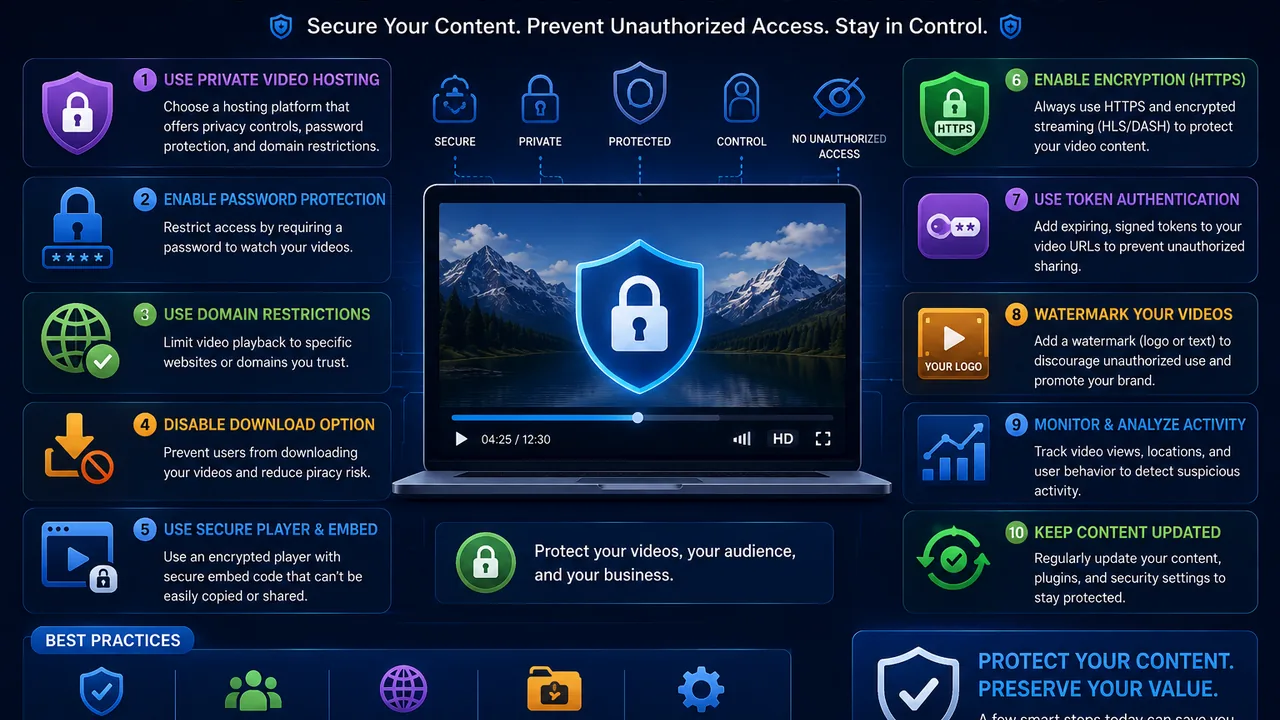
The practical objective is therefore not to promise impossible protection. If you want a broader foundation first, read our guide explaining what secure video hosting is and how private delivery, access controls, embeds, and streaming work together. It is to build multiple layers of control that reduce unauthorized access, casual sharing, unwanted embedding, and direct exposure of valuable video content.
This guide explains the most important ways to protect videos online and how to build a more secure video-delivery workflow.
Why Video Content Protection Matters
Not every online video requires the same level of protection.
A public marketing video is designed to be shared.
A paid course lesson is not.
This distinction should influence how the video is hosted and delivered.
If valuable content is available through an unrestricted direct URL, users may be able to access it outside the website experience you intended.
If an embed can be copied freely, the player may potentially appear on websites you do not control.
If premium videos are published through completely public pages, application-level membership restrictions may provide little value.
Video security therefore begins by understanding what you're protecting and who should have access to it.
Start by Classifying Your Videos
Before choosing security controls, separate videos according to their purpose.
A simple classification might look like this:
Public videos — Content intended for anyone to watch and share.
Unlisted videos — Content that isn't actively promoted publicly but doesn't contain highly sensitive information.
Member-only videos — Content intended for authenticated users.
Premium videos — Content available to paying customers or subscribers.
Internal videos — Business material intended for employees or authorized teams.
Sensitive videos — Content requiring stronger organizational security controls.
This matters because applying maximum restrictions to every video can create unnecessary friction.
Security should match the content's actual risk and business value.
Use Dedicated Secure Video Hosting
The first architectural decision is where the video lives.
Hosting valuable videos directly inside a normal public web directory can make access control more difficult, particularly if direct media URLs remain broadly accessible.
A dedicated secure video hosting solution can provide publishers with additional controls around how videos are stored, embedded, and delivered.
Depending on the platform, these may include password protection, domain restrictions, geographic controls, private video options, and other access-related features.
The hosting layer should then work together with your website's own authentication and authorization system.
Protect the Website Before Protecting the Player
One common mistake is focusing entirely on the video player.
For membership and premium websites, security often starts earlier.
Before a user even reaches the video page, your application should determine whether that person is authorized to access the content.
For example, a membership website might check:
- Is the visitor logged in?
- Does the account have an active membership?
- Does that membership include this content?
- Has the account been restricted?
- Should this user be allowed to open this page?
Only after those checks succeed should the application provide access to the protected viewing environment.
This creates an important separation:
Your application controls the user.
Your video infrastructure controls media delivery.
Both layers matter.
Password-Protect Videos When Appropriate
Password protection is one of the simplest forms of video access control.
The viewer must provide the correct password before accessing protected content.
This can work well for:
- Client previews
- Private presentations
- Small team videos
- Limited-access events
- Temporary content sharing
It is easy to understand and doesn't necessarily require a complete membership system.
However, password protection has limitations.
A password can itself be shared.
For a large paid membership service, using one shared password for hundreds of customers may therefore be less effective than individual account authentication.
Use password protection where it matches the use case rather than treating it as a universal security solution.
Use Domain Restrictions for Embedded Videos
Domain restrictions can be particularly useful when your videos are intended to play only on specific websites.
Suppose your authorized website is:
example.com
You embed your premium player there.
Without appropriate controls, someone may attempt to copy the embed code and place it on another domain.
A domain restriction can add a layer of control by limiting where playback or embedding is permitted, depending on the provider's implementation.
This is useful for:
- Course websites
- Membership sites
- Premium publishers
- SaaS applications
- Customer portals
Domain restrictions don't prevent every possible method of content capture, but they can reduce casual embed theft and unauthorized third-party usage.
Avoid Exposing Permanent Direct Video URLs
Direct media URLs require careful handling.
If your application protects a webpage but then exposes a permanent unrestricted file URL, users may be able to bypass parts of the intended access flow.
For sensitive applications, publishers should consider whether media access should be temporary, validated, or otherwise controlled rather than relying solely on a permanently accessible direct link.
The exact implementation depends on the video infrastructure being used.
For custom systems, this may involve signed or time-limited access mechanisms.
The principle is straightforward:
Protecting the webpage is not enough if the underlying protected asset remains unrestricted.
Consider Expiring or Signed Access
For applications requiring stronger control, temporary authorization can be more useful than permanent public links.
A signed or expiring URL typically includes information that allows the server or delivery system to validate whether a request should still be accepted.
For example, an application could generate access that expires after a limited period.
After expiration, reauthorization would be required.
This can reduce the usefulness of a media URL copied from an authorized session and shared indefinitely.
However, signed URLs must be implemented carefully.
Keys and signing secrets should remain server-side and should never be exposed to the browser as reusable credentials.
Use HTTPS Everywhere
Video security also depends on transport security.
Your website, APIs, player resources, and media delivery should use HTTPS wherever appropriate.
HTTPS encrypts traffic between the viewer and the service while it travels across the network.
Without encrypted transport, sensitive requests may be more exposed to interception on insecure networks.
HTTPS does not stop an authorized viewer from recording a video, but it is a fundamental part of modern web security.
It should be considered a baseline rather than an optional premium feature.
Secure Your Embed Workflow
An embedded video often involves several components:
Website page → player → authorization → streaming resources
Each layer should be considered.
For example, ask:
- Can anyone open the player URL?
- Can the embed be used on another domain?
- Does the underlying media remain accessible indefinitely?
- Does authorization expire?
- What happens after a user's subscription ends?
- Can a logged-out user reuse previously obtained access?
These questions help identify gaps that may not be obvious when simply testing whether the video plays.
Use Application Authentication for Membership Content
For large membership platforms, individual user authentication is generally more manageable than sharing one password.
The application already knows who the user is.
It can also know:
- Subscription status
- Account role
- Purchased products
- Course enrollment
- Account restrictions
- Content permissions
This information can be used to determine whether the user should receive access to a particular video.
A Laravel application, for example, might protect the video page with authentication and subscription middleware before rendering the player.
WordPress membership systems can apply similar logic through their own access-control mechanisms.
The video platform then handles the media itself.
Authentication and Authorization Are Different
These terms are often confused.
Authentication answers:
Who is this user?
Authorization answers:
Is this user allowed to access this video?
A user may be correctly logged in but still not have permission to view every piece of content.
For example, a subscriber on a Basic plan may not be authorized to watch videos reserved for Premium customers.
A secure application needs both checks.
Simply verifying that someone has an account may not be sufficient.
Protect Premium Videos After a Subscription Expires
Subscription services need to think beyond initial access.
Suppose a customer purchases one month of Premium access.
During that month, they are authorized to watch certain videos.
When the subscription expires, your application should update the user's authorization accordingly.
If previously issued media access remains permanently valid, the subscription check may be easier to bypass.
This is another reason temporary or session-linked authorization can be valuable in premium applications.
Your business logic and video-delivery logic should remain synchronized.
Consider Geographic Restrictions When Necessary
Some publishers need to limit content availability by country or region.
This can happen because of:
- Licensing agreements
- Distribution contracts
- Regional business policies
- Content rights
Geographic restrictions can provide another layer of access control.
However, they should be used for a genuine business requirement rather than added unnecessarily.
IP-based location detection is also not perfect. VPNs, proxies, mobile networks, and routing can complicate geographic identification.
Treat geographic restrictions as one control among several rather than absolute proof of a viewer's location.
Can You Completely Prevent Screen Recording?
No.
This is one of the most important realities of online video security.
If a legitimate viewer is allowed to see content on a screen, it is extremely difficult to guarantee that the displayed content can never be captured.
Users may have access to:
- Screen-recording software
- External capture hardware
- Another camera pointed at the screen
Browser restrictions alone cannot eliminate every possibility.
A trustworthy video-security strategy should therefore avoid claims such as:
"100% impossible to download or record."
A more realistic objective is to make unauthorized access and redistribution increasingly difficult and traceable.
Watermarking Can Discourage Redistribution
Watermarking is another possible layer of content protection.
A basic watermark might display a brand name or logo.
More advanced systems can display viewer-specific information such as:
- User ID
- Email identifier
- Session identifier
- Transaction reference
This can discourage unauthorized redistribution because leaked footage may contain information connecting it to the authorized session.
Dynamic watermarking is particularly relevant for high-value educational, business, or premium media.
However, it should be implemented carefully to avoid exposing unnecessary personal information.
What Is DRM?
DRM stands for Digital Rights Management.
DRM systems can provide stronger content protection by controlling how encrypted media is accessed and decrypted by authorized playback environments.
Commercial streaming services frequently use DRM for high-value licensed content.
DRM can be useful for:
- Premium entertainment
- Licensed films
- High-value courses
- Enterprise media
- Content with strict distribution agreements
However, DRM adds complexity.
Not every website needs it.
A small membership site may find authentication, secure hosting, domain controls, and temporary access sufficient for its threat model.
Security should be proportional to the value and sensitivity of the content.
Secure Streaming Matters Too
Protecting access is only one part of the problem.
Authorized users still expect good playback.
A secure system that creates excessive delays, repeated authorization failures, or constant buffering can damage the customer experience.
Security and streaming therefore need to work together.
A video streaming platform should deliver media efficiently while the surrounding system applies appropriate access controls.
For publishers, the goal is:
Strong enough protection without unnecessary friction for legitimate viewers.
Protect Your Video API
Custom video applications frequently rely on APIs.
If your website uses an API to create uploads, retrieve files, delete videos, or manage content, those endpoints require protection too.
Important principles include:
- Keep secret API credentials server-side.
- Do not place private API keys in public JavaScript.
- Authenticate sensitive requests.
- Validate user permissions.
- Apply reasonable rate limits.
- Log important account actions.
- Rotate credentials when necessary.
A secure video player is not enough if an exposed API allows unauthorized users to manage the underlying files.
Never Put Secret Keys in Front-End JavaScript
This deserves particular attention.
Anything delivered to the browser should generally be treated as visible to the user.
JavaScript bundles can be inspected.
Network requests can be observed.
HTML can be viewed.
If a private API secret is placed directly into front-end code, an attacker may be able to extract it.
Sensitive operations should normally pass through your backend.
Your server holds the secret credentials and communicates with the external service on behalf of the authorized user.
Protect Video Uploads as Well as Playback
Security is not only about viewers.
User-generated video platforms must also protect the upload process.
Consider:
- Who is allowed to upload?
- What file types are accepted?
- What is the maximum upload size?
- How many files can an account upload?
- Are uploads associated with the correct user?
- Can one user modify another user's files?
- Are suspicious uploads reviewed appropriately?
Upload authorization prevents users from consuming resources or manipulating files outside their permitted scope.
For large platforms, storage abuse can become just as serious as playback abuse.
Apply Rate Limits Where Appropriate
Automated abuse can generate large numbers of requests very quickly.
Rate limiting can help protect selected endpoints from excessive usage.
This may be useful for:
- Login attempts
- API calls
- Upload initialization
- Password checks
- Token generation
Rate limits need to be designed carefully.
If they are too aggressive, legitimate users may be blocked.
If they are too permissive, they may provide little protection.
The correct limits depend on normal application behavior.
Monitor Suspicious Account Activity
Security improves when unusual behavior can be identified.
Depending on your application and privacy requirements, potentially useful signals might include:
- Unusual login activity
- Extremely high request volume
- Repeated failed authorization attempts
- Sudden upload spikes
- Unexpected API activity
- Large changes in bandwidth usage
One unusual event does not automatically mean an account is malicious.
Monitoring should help identify cases worth investigating rather than automatically accusing users based on a single signal.
Keep Software Updated
A secure video architecture can still be compromised through an outdated application.
Your surrounding stack may include:
- Web server
- Operating system
- PHP
- Laravel
- WordPress
- Plugins
- JavaScript packages
- Database software
- Video processing tools
Known vulnerabilities in outdated software can create risks unrelated to the video platform itself.
Security maintenance therefore needs to cover the entire stack.
Backups Are Part of Video Security
Security isn't only about preventing unauthorized viewing.
Availability and recovery also matter.
If important video files are accidentally deleted, corrupted, or lost because of an infrastructure failure, access controls won't help you recover them.
Critical media may therefore require an appropriate backup or replication strategy.
The exact strategy depends on:
- Library size
- Business value
- Recovery requirements
- Storage cost
- Acceptable downtime
For very large libraries, keeping multiple complete copies can become expensive, so backup policies should be designed intentionally.
Private Video Hosting for Online Courses
Course creators have a particularly clear threat model.
The public should be able to discover the course.
But only enrolled students should receive access to premium lessons.
A reasonable architecture might look like:
Student login
↓
Enrollment/subscription check
↓
Protected lesson page
↓
Authorized video player
↓
Secure video delivery
The learning platform manages student entitlement while dedicated video infrastructure handles the media.
This is generally more structured than simply placing public video URLs inside course pages.
Private Video Hosting for Membership Websites
Membership sites have similar requirements.
Users may move between different subscription tiers.
Some videos may be public.
Others may require Basic membership.
Others may require Premium.
The application should therefore make authorization decisions at the content level.
A dedicated video hosting platform can manage video infrastructure, while the membership application decides which users should receive access.
This separation can make the system easier to scale and maintain.
Video Protection for Businesses
Businesses may need to protect:
- Training material
- Internal announcements
- Product documentation
- Client presentations
- Recorded meetings
- Proprietary tutorials
The appropriate security level depends on the information involved.
A general training video may require simple authenticated access.
Highly confidential corporate information may require enterprise security, compliance controls, identity management, audit logging, and stricter policies beyond a normal video-hosting service.
The platform should be selected according to the sensitivity of the data.
Common Video Security Mistakes
Several mistakes repeatedly weaken otherwise protected systems.
Relying Only on a Hidden URL
A difficult-to-guess URL is not the same as authorization.
If the link is shared, the content may become accessible.
Using One Password for Every Customer
Shared passwords can spread quickly and provide limited accountability.
Protecting the Page but Not the Media
A login wall offers limited protection if the underlying media remains permanently and publicly accessible.
Exposing API Secrets in JavaScript
Client-side secrets should be assumed discoverable.
Ignoring Expired Accounts
Access should reflect current subscription or permission status.
Promising Impossible Protection
No system can guarantee that authorized viewers will never capture displayed content.
Adding So Much Security That Legitimate Users Cannot Watch
Security that repeatedly blocks paying customers creates another business problem.
Balance matters.
A Practical Video Protection Checklist
Before publishing premium or private video, ask:
- Is the viewing page protected appropriately?
- Does the application authenticate the user?
- Does it verify authorization for this specific content?
- Are direct media URLs unnecessarily exposed?
- Are domain restrictions available and appropriate?
- Would password protection help this use case?
- Should access expire?
- Is all sensitive traffic using HTTPS?
- Are API credentials kept server-side?
- Are uploads properly authorized?
- What happens when a subscription expires?
- Is suspicious activity monitored appropriately?
- Are critical videos backed up?
- Does the security system still provide a good viewing experience?
If several of these questions reveal gaps, improve the architecture before adding more valuable content.
Is Secure Video Hosting Enough on Its Own?
Usually, video security works best as a layered system.
Think of it this way:
Layer 1: User authentication
Layer 2: Content authorization
Layer 3: Secure video hosting
Layer 4: Embed/domain controls
Layer 5: Temporary or validated media access where required
Layer 6: HTTPS
Layer 7: Monitoring and application security
Layer 8: Additional protection such as watermarking or DRM when justified
An attacker or unauthorized user then has to deal with multiple controls rather than one easily shared link.
This is generally a stronger security model than relying on a single feature.
Final Thoughts
Protecting online video isn't about finding one magic setting that makes content impossible to copy.
Effective video security comes from layers of control.
Start by determining who should have access.
Protect the website with authentication and authorization.
Use hosting infrastructure that supports the access controls your project requires.
Restrict embedding where appropriate.
Avoid unnecessarily exposing permanent media links.
Keep private credentials on the server.
And for highly valuable content, consider stronger technologies such as dynamic watermarking or DRM where your threat model justifies them.
At the same time, don't forget the legitimate viewer. Security should protect your content without making the service frustrating for customers who are authorized to watch it.
For publishers building private or premium video experiences, FileMoon's secure video hosting page explains the available approach to protected video delivery.
You can also explore the broader video hosting platform for video management and the video streaming platform for playback and delivery infrastructure.

Comments (0)
No comments found