









Video Hosting for Websites: Why You Shouldn’t Host Large Videos on Your Web Server
Adding video to a website can improve product pages, tutorials, courses, membership areas, documentation, and user engagement. The technical problem begins when website owners treat large video files like ordinary images or PDFs and upload everything directly to the same server running the website.
At first, this approach may appear to work.
You upload an MP4 file, place it inside a video player, and visitors can press play. For a small website with limited traffic, that may be enough.
But video files behave very differently from normal webpage assets. They are larger, consume more bandwidth, and can create significant delivery demands when multiple people watch at the same time.
This is why video hosting for websites is often handled through dedicated infrastructure rather than the primary web server.
In this guide, we'll explain what happens when you host videos directly on your server, why problems can appear as traffic grows, and when a dedicated video hosting platform makes more sense.
What Is Video Hosting for Websites?
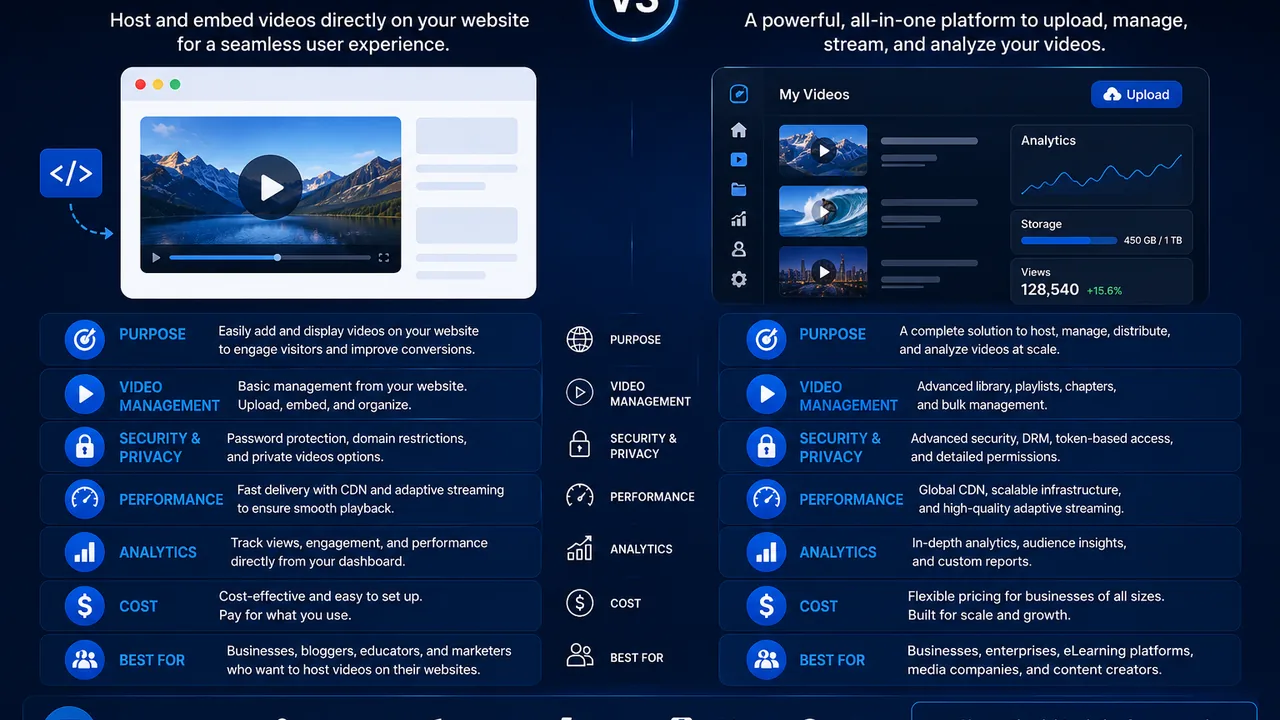
Video hosting for websites means storing and delivering video content that will be viewed through a website or web application.
There are two common approaches.
The first is self-hosting.
You upload the video directly to your own server or hosting account and serve it from there.
The second is using a dedicated video hosting provider.
In that model, the website continues handling pages, users, databases, and application logic, while the video platform handles video storage, processing, and delivery.
The website then embeds the video player or connects to the hosting service.
For many growing projects, this separation creates a cleaner infrastructure.
FileMoon, for example, provides a dedicated video hosting platform designed for publishers who want to upload, manage, embed, and deliver videos without relying entirely on their main website server.
Why Website Owners Often Start by Self-Hosting Videos
Self-hosting feels simple because everything remains in one place.
If you use WordPress, you can upload a video through the Media Library.
If you use Laravel or another custom application, you can save uploaded files to local storage and generate a URL.
There is no additional platform to learn.
You control the server.
You control the file.
And for a small number of videos, this may work perfectly well.
The problem is that this simplicity can become expensive operationally as the video library and audience grow.
Video Files Are Much Larger Than Normal Website Assets
A normal webpage may include:
- HTML
- CSS
- JavaScript
- Images
- Fonts
- Small API responses
Even an image-heavy page may still be relatively small compared with a long HD video.
A single video could be hundreds of megabytes or several gigabytes depending on its duration, resolution, bitrate, and encoding.
Now imagine multiple visitors watching that file simultaneously.
The server isn't just delivering a webpage anymore.
It is continuously sending large amounts of media data to viewers.
This changes the resource profile of the website dramatically.
Bandwidth Can Become a Major Problem
Storage and bandwidth are different.
You might store a 1 GB video only once.
But if that video is watched repeatedly, the amount of data transferred can be many times larger than the original file.
For example, if viewers collectively consume 1 GB of video data 1,000 times, that represents roughly 1 TB of delivery traffic.
Actual transfer depends on how much viewers watch, the bitrate delivered, caching, and other technical factors, but the basic principle remains the same:
Videos can be stored once and transferred repeatedly.
This is why website owners should evaluate video bandwidth separately from storage.
Your Web Server Has Other Jobs
Your website server may already be responsible for many tasks.
On a WordPress website, it can be handling:
- PHP execution
- Database requests
- WooCommerce
- User sessions
- Plugin operations
- Page generation
- Admin requests
- Scheduled tasks
A Laravel server may also handle:
- Authentication
- Uploads
- API requests
- Database operations
- Queues
- Application logic
- User dashboards
When the same server is also responsible for transferring large videos to many concurrent viewers, those workloads begin competing for resources.
This doesn't mean every website will immediately fail.
It means video can create an additional resource burden that should be considered as the project scales.
Why Concurrent Viewers Matter
One person streaming a video may not create a noticeable problem.
One hundred people watching videos at the same time can create a very different load.
Streaming is not simply about the size of the file.
It is also about how much data must be delivered at the same time.
If many users request high-bitrate content simultaneously, your server and network connection must support that combined throughput.
This is one reason a website can appear perfectly healthy during testing but struggle when traffic suddenly increases.
Dedicated video infrastructure is designed specifically around media workloads.
Disk Space Can Disappear Quickly
Video libraries grow fast.
Suppose you upload 100 videos averaging 1 GB each.
That is approximately 100 GB of source media.
Now consider a publisher with 5,000 videos.
At the same average size, the source library alone could reach several terabytes.
If the platform also creates processed versions of those files, total storage requirements may become larger.
On a traditional website server, this can put pressure on the same disks needed for:
- Website files
- Databases
- Backups
- Logs
- Temporary files
- Application storage
Keeping video storage separate can make capacity planning much easier.
Backups Become Larger and More Complicated
Large local video libraries can also affect backup strategy.
Backing up a normal website containing code, a database, and images is one thing.
Backing up terabytes of video content is another.
Backup windows become longer.
Storage requirements increase.
Restores can take more time.
And copying large media libraries between servers can consume significant bandwidth.
When video is separated into dedicated storage or hosting infrastructure, website backups can remain focused on the application and business data.
You still need a media backup strategy where appropriate, but the two workloads no longer have to be treated as one giant server snapshot.
Hosting Large Videos on Shared Hosting Is Even More Difficult
Shared hosting is usually designed for standard websites.
Providers may impose limitations on:
- Disk space
- CPU
- Memory
- File sizes
- Bandwidth
- Execution time
- Concurrent processes
A small video embedded on a low-traffic page may work.
A large streaming library generally creates a very different type of workload.
This is particularly important for website owners who assume an "unlimited" hosting plan literally means unlimited media streaming.
Hosting terms and resource policies should always be reviewed carefully.
VPS Hosting Gives More Control, But Not Unlimited Resources
Moving to a VPS provides more control than shared hosting.
You can configure Nginx, PHP, storage, caching, and other components yourself.
But a VPS still has finite resources.
For example:
- Limited CPU cores
- Limited RAM
- Limited disk space
- Limited network throughput
- Potential bandwidth limits
You may also be responsible for server management, monitoring, security, backups, and scaling.
A VPS can absolutely host video under the right circumstances, but it does not automatically remove the challenges associated with high-volume media delivery.
Dedicated Servers Can Handle More, But Architecture Still Matters
A dedicated server gives you significantly more control over hardware resources.
For some video businesses, dedicated servers form an important part of the infrastructure.
However, simply buying a more powerful server is not always the best long-term answer.
If the same machine handles the database, web application, uploads, transcoding, and high-volume video delivery, one workload can still interfere with another.
At scale, infrastructure is often divided into specialized components.
For example:
Application servers handle website logic.
Storage systems hold media files.
Workers process video.
Streaming infrastructure delivers content.
This separation improves flexibility and makes it easier to scale individual workloads independently.
Video Processing Is Another Resource-Intensive Task
Video hosting isn't only about storing files.
Uploaded videos may need to be processed before they are suitable for online playback.
Transcoding can involve substantial CPU usage.
A large source video may need to be:
- Analyzed
- Re-encoded
- Resized
- Converted
- Segmented
- Prepared for streaming
If these jobs run on the same server handling your website traffic, they can consume resources needed by normal users.
This is why larger video systems frequently use dedicated workers or external video processing infrastructure.
Streaming an MP4 File Is Not the Same as a Full Streaming Workflow
Website owners sometimes describe any browser-playable MP4 as "streaming."
Technically, browsers can begin playing files while data continues downloading.
But professional video platforms may use more structured streaming methods such as HLS.
With HLS, video can be delivered through smaller media segments with playlists guiding the player.
This can support more flexible web playback and, when multiple representations are available, adaptive delivery.
If streaming experience is important to your site, you should evaluate a dedicated video streaming platform rather than thinking only about where the original MP4 file is stored.
Why Seeking Can Be Better With Proper Video Infrastructure
Seeking is what happens when a viewer jumps forward or backward in the timeline.
This is especially important for:
- Tutorials
- Courses
- Long-form videos
- Webinars
- Training content
- Movies
- Recorded meetings
If the infrastructure does not handle range requests or streaming appropriately, seeking can feel slow or unreliable.
Viewers expect to click a point in the timeline and resume playback quickly.
A good video hosting architecture should therefore be tested not only for initial playback but also for navigation through the video.
Mobile Viewers Make Delivery More Complex
Desktop testing often happens on fast broadband.
Real users may be watching on:
- 4G
- 5G
- Public Wi-Fi
- Congested networks
- Older phones
- Low-powered devices
This means a single high-bitrate video file may not provide the ideal experience for every viewer.
Modern streaming workflows can prepare content for different playback conditions where supported.
This is another reason the underlying video-delivery system matters.
Dedicated Hosting Can Keep Your Main Website Faster
A dedicated video platform does not automatically make every webpage faster.
However, separating large media delivery from your main application can reduce the amount of video traffic handled directly by the web server.
Your website can focus on delivering:
- Pages
- User authentication
- Database-driven content
- Membership logic
- Payments
- Application features
While the video platform handles:
- Video storage
- Media processing
- Streaming
- Playback delivery
This division of responsibilities can create a cleaner architecture.
Video Hosting for WordPress
WordPress is one of the most common places where this issue appears.
The Media Library makes uploading videos easy.
But that does not mean WordPress itself should become your entire video infrastructure.
Suppose you run a membership website with hundreds of HD lessons.
If every video sits inside your normal hosting account, the same environment may need to manage WordPress, the database, plugins, members, backups, and large video transfers.
Instead, videos can be stored externally and embedded into WordPress.
WordPress then remains responsible for the content and user experience while the video platform handles media delivery.
Video Hosting for Laravel Applications
Custom applications have similar considerations.
A Laravel application can easily accept uploads and store files locally.
That approach may be useful during development or for smaller workloads.
But as video usage grows, developers may decide to separate media from application infrastructure.
Laravel can continue handling:
- User registration
- Authentication
- Subscription logic
- File records
- Permissions
- Dashboards
- Payments
The video service can handle media storage and delivery.
If the hosting provider exposes suitable API capabilities, these systems can be integrated into one user experience.
Video Hosting for Online Courses
Online course websites can accumulate enormous libraries over time.
One course might include:
- 50 lessons
- 20 hours of video
- Multiple downloadable resources
Now multiply that across dozens or hundreds of courses.
Storage is only part of the challenge.
Students may watch the same videos repeatedly, meaning delivery traffic can become substantial.
Course owners should evaluate:
- Embedded playback
- Long-form video performance
- Seeking
- Mobile support
- Access controls
- Storage
- Streaming
- Scalability
For paid courses, playback quality becomes part of the customer experience.
Video Hosting for Membership Sites
Membership websites have an additional concern:
content access.
A video may only be intended for users with a valid membership.
This means hosting must work alongside your authentication system.
The website determines whether a user is allowed into the protected area.
The video platform handles delivery.
Depending on the project, publishers may also need password protection, embed controls, or other restrictions.
For these use cases, it's worth evaluating secure video hosting capabilities in addition to standard storage and playback.
Video Hosting for SaaS Products
Some SaaS products allow their own customers to upload or manage videos.
This creates a more complex requirement.
The product may need:
- User-based upload limits
- Storage accounting
- Processing queues
- API integration
- Video status tracking
- Embedded playback
- Deletion workflows
- Access controls
In this scenario, video infrastructure becomes part of the product backend.
Scalability and API integration can be just as important as player design.
When Self-Hosting Videos Can Still Be Reasonable
Dedicated video hosting is not mandatory for every website.
Self-hosting may be reasonable when:
- You have only a few videos
- Traffic is low
- Files are relatively small
- You have sufficient server resources
- You understand server administration
- Advanced streaming is unnecessary
- You do not need large-scale processing
There is no reason to add complexity when your requirements are simple.
The important point is knowing when the project has outgrown that architecture.
Signs You May Have Outgrown Self-Hosted Video
Consider dedicated infrastructure if you begin noticing problems such as:
- Rapidly increasing disk usage
- Very large backup sizes
- Slow transfers
- High server bandwidth
- Video playback affecting website performance
- Increasing concurrent viewers
- Large processing workloads
- Frequent storage expansion
- Need for better access controls
- Need for API automation
- Large libraries becoming difficult to manage
You do not necessarily need to wait for the server to fail.
Infrastructure changes are easier when planned before a crisis.
What to Look for in a Website Video Hosting Platform
A provider should be evaluated against your actual workload.
Important considerations include:
Upload Support
The platform should handle the types and sizes of files you commonly upload.
Video Processing
Understand how long processing takes and what formats are prepared.
Streaming
Check how video is delivered and whether the streaming workflow suits your audience.
Embedding
Website publishers need a straightforward way to place videos inside pages and applications.
Player Experience
Test playback, seeking, fullscreen, mobile use, and general responsiveness.
Security
If content is private or premium, check which access controls are available.
Storage
Estimate both current usage and future library growth.
Scalability
Think about what happens if your traffic or upload volume increases significantly.
API Access
Custom websites and SaaS applications may require programmatic integration.
Pricing
Evaluate storage, delivery, processing, and any other relevant charges together.
The lowest headline price is not always the lowest total cost.
Should You Use Public Video Platforms Instead?
Public video platforms can be excellent for marketing and discovery.
They already have audiences and recommendation systems.
If your goal is to reach new viewers, they can be extremely valuable.
But website video hosting often serves a different purpose.
You may need:
- Private content
- Premium videos
- Your own website experience
- Course lessons
- Customer dashboards
- Internal videos
- Greater embed control
In those cases, a dedicated video hosting solution may complement public platforms rather than replace them.
Use public platforms where discovery matters.
Use dedicated hosting where your own website should remain the center of the experience.
A Better Architecture for Growing Video Websites
A scalable architecture often separates responsibilities.
A simplified version might look like this:
Website/Application
Handles users, pages, payments, memberships, and business logic.
↓
Video Hosting Platform
Handles uploads, video records, storage, and media management.
↓
Processing Infrastructure
Prepares uploaded videos for playback.
↓
Streaming Infrastructure
Delivers video content to viewers.
↓
Embedded Player
Provides the final user-facing experience.
Not every website needs all these layers as separate services.
But thinking in these terms helps explain why putting everything on one web server becomes more difficult at scale.
Is Dedicated Video Hosting Worth the Cost?
The answer depends on how important video is to your project.
If you have three short marketing videos, additional infrastructure may not be worth the complexity.
If your business stores thousands of videos, serves a large audience, or depends on video subscriptions, the economics are different.
Dedicated hosting may reduce the need to build and maintain several components yourself.
When comparing cost, include:
- Server hardware
- Storage
- Bandwidth
- Video processing
- Backup storage
- System administration
- Developer time
- Monitoring
- Scaling
- Maintenance
A platform that initially looks more expensive may sometimes reduce operational work elsewhere.
Final Thoughts
Hosting videos directly on your website server is not inherently wrong.
For small projects, it may be the simplest solution.
The problems appear when the video library, traffic, processing workload, and storage requirements begin growing faster than the original infrastructure was designed to handle.
At that point, separating video from the main website can provide a more manageable architecture.
Your web server can concentrate on the application.
Your video infrastructure can concentrate on media.
If your website is reaching that stage, you can explore FileMoon's video hosting platform for dedicated video management and delivery.
For playback-focused requirements, see the video streaming platform. If you're handling private, premium, or controlled-access videos, explore secure video hosting




Comments (0)
No comments found