









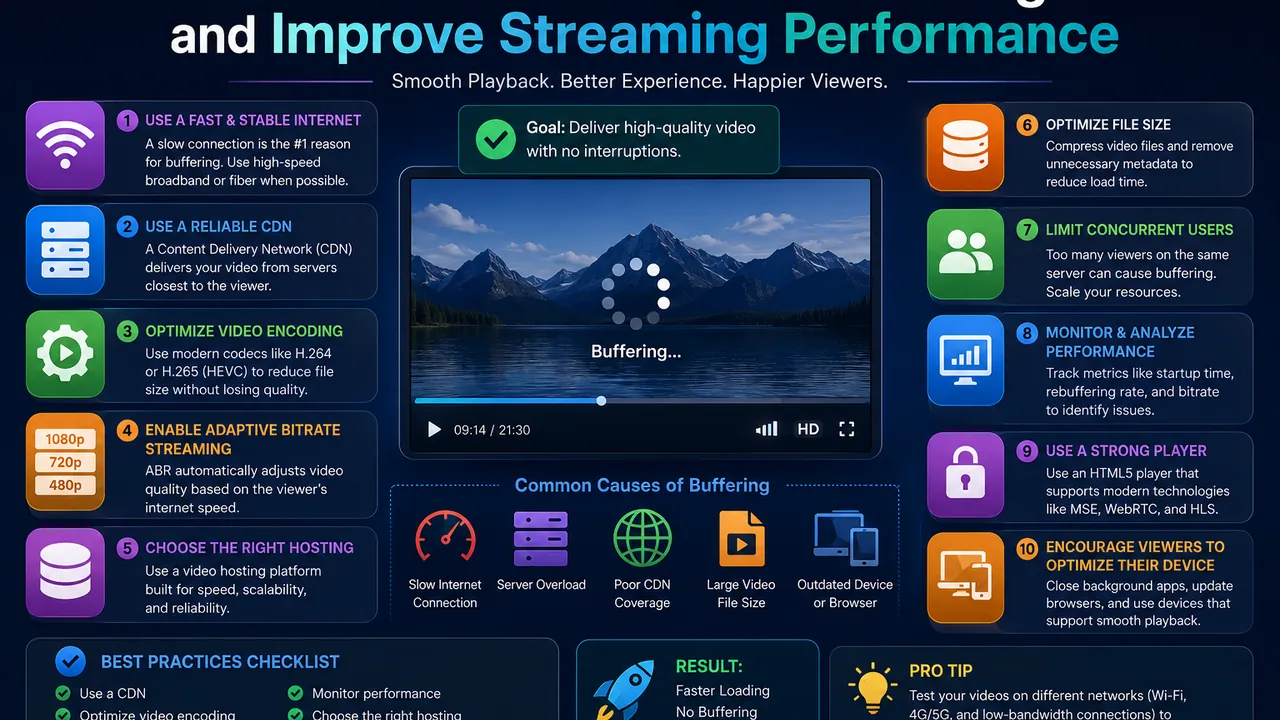
How to Reduce Video Buffering and Improve Streaming Performance
Few things frustrate online viewers more than a video that repeatedly stops to load.
A visitor presses play, watches for a few seconds, and suddenly sees a loading indicator. Playback resumes, only to stop again. If this happens frequently, many viewers will simply leave rather than wait.
For website owners, buffering is more than a technical inconvenience. It can affect the entire user experience of an online course, membership service, media website, product demonstration, or video-based application.
The difficult part is that buffering doesn't have a single cause.
The viewer's internet connection matters. Video bitrate matters. Encoding matters. Server capacity matters. Delivery infrastructure matters. Even the way the video player handles buffering and seeking can influence the experience.
That means there is no legitimate switch that can guarantee zero buffering for every viewer.
What publishers can do is understand the common bottlenecks and build a streaming workflow that reduces avoidable interruptions.
This guide explains how to reduce video buffering, improve online video delivery, and identify where playback problems may actually be coming from.
What Is Video Buffering?
Video buffering is the process of temporarily storing a portion of video data on the viewer's device before or during playback.
Buffering itself is not necessarily a problem.
In fact, some buffering is useful.
A player generally wants enough upcoming media available so that small network fluctuations don't immediately interrupt playback.
The problem occurs when playback catches up with the available buffered media.
At that point, the player may have to stop and wait for additional video data to arrive.
The viewer experiences this as a loading or buffering pause.
Why Do Online Videos Keep Buffering?
There are many possible causes, and they can exist on either side of the connection.
A streaming provider may have excellent infrastructure while a viewer is connected through unstable mobile data.
Alternatively, the viewer may have a fast connection while the source server cannot deliver media quickly enough.
Common causes include:
- Slow internet connections
- Network congestion
- Excessively high video bitrate
- Poor video encoding
- Limited server throughput
- Delivery infrastructure problems
- Insufficient buffering
- Device performance limitations
- Browser compatibility issues
- Unoptimized source files
- Sudden traffic spikes
- Slow or overloaded origin servers
Before trying to fix buffering, it is important to determine whether the problem affects one viewer, one geographic region, one video, or the entire platform.
That distinction can save considerable troubleshooting time.
Internet Speed and Video Bitrate Must Work Together
One of the most important relationships in video streaming is the relationship between available bandwidth and video bitrate.
Bitrate describes roughly how much video data needs to be delivered over a period of time.
Higher-quality video often requires more data.
Suppose a viewer's connection can reliably deliver less data than the selected video representation requires.
The player may initially buffer enough content to begin playback, but eventually playback can catch up with the incoming data.
The result is repeated buffering.
This is why simply creating the highest-quality possible video isn't always the best streaming strategy.
Quality needs to be balanced against realistic viewing conditions.
Higher Resolution Does Not Automatically Mean Better Streaming
Publishers naturally want their videos to look good.
That can lead to a simple assumption:
Higher resolution = better experience.
But the viewing experience involves more than image resolution.
A beautiful high-bitrate video that stops every few seconds can provide a worse experience than a slightly lower-quality stream that plays continuously.
Resolution, codec, bitrate, frame rate, and source complexity all influence the amount of data required.
The objective should be appropriate visual quality at an efficient bitrate, not simply the largest possible file.
Video Encoding Can Make a Major Difference
Two videos with the same duration and resolution can have very different file sizes and bitrates.
Encoding configuration matters.
Poorly optimized media may consume more bandwidth than necessary for the visual quality it provides.
When preparing videos for the web, publishers should think about:
- Resolution
- Bitrate
- Codec
- Frame rate
- Audio bitrate
- Content complexity
A screen recording with mostly static content doesn't necessarily need the same encoding profile as fast-moving sports footage.
Professional video platforms can help automate parts of this processing rather than requiring publishers to manually prepare every viewing format.
What Is HLS and How Can It Help?
HLS stands for HTTP Live Streaming.
For a broader explanation of the complete delivery workflow, read our guide on how a video streaming platform works, including video processing, HLS, adaptive delivery, playback, and streaming infrastructure.
Instead of delivering a video solely as one large media object, an HLS workflow can divide content into smaller segments referenced through playlists.
The player requests these segments as playback progresses.
This approach is widely used for online video because it fits well with HTTP-based delivery infrastructure and can support multiple video representations.
A modern video streaming platform may use HLS as part of the workflow for preparing and delivering videos to viewers.
HLS does not magically eliminate every buffering problem, but it provides a more flexible foundation for web streaming than treating every viewing session as a simple large-file download.
Adaptive Bitrate Streaming Can Handle Changing Connections
A viewer's internet connection isn't necessarily stable throughout an entire video.
Imagine someone watching on a phone.
At the beginning, they may have a strong Wi-Fi connection.
A few minutes later, network congestion appears.
If the player can only access one high-bitrate representation, it has limited options when available bandwidth drops.
Adaptive bitrate streaming can provide multiple representations of the same content.
For example, a streaming workflow might make several quality levels available.
A compatible player can then select a representation based on current playback conditions and change when necessary.
When bandwidth decreases, switching to a lower-bitrate representation can be preferable to stopping playback repeatedly.
When conditions improve, the player may be able to use a higher-quality representation.
Adaptive Streaming Is About Balance
The goal of adaptive streaming isn't simply to deliver the highest resolution at all times.
The goal is to balance:
Quality + available bandwidth + playback continuity.
This distinction matters.
From the viewer's perspective, continuous playback is often more important than maintaining maximum quality during temporary network congestion.
A good adaptive streaming strategy attempts to provide the best sustainable experience rather than forcing one representation onto every user.
Initial Video Loading Should Be Considered Separately
Some publishers focus only on buffering that occurs after playback has started.
But the delay before playback begins also matters.
If a user presses play and waits a long time before seeing the first frame, the experience can feel slow even if the rest of the video plays perfectly.
Startup time can be influenced by:
- Player initialization
- Manifest retrieval
- Initial media requests
- Server response time
- Network latency
- Video configuration
- Authentication requests
- Advertising or analytics integrations
When diagnosing performance, measure both:
time to first playback and buffering during playback.
They are related but not identical problems.
Don't Load More Video Data Than Necessary Before Play
A webpage containing a video should ideally remain responsive.
If the browser is forced to download large amounts of media before the viewer has even decided to watch, page performance may suffer.
The appropriate loading strategy depends on the player and use case, but publishers should think carefully about what is loaded when the page opens.
For websites containing multiple videos on one page, this becomes even more important.
Initializing several heavy players simultaneously can create unnecessary network and browser workload.
The Origin Server Can Become a Bottleneck
The viewer's connection is not always responsible for buffering.
Sometimes the problem is on the server side.
Imagine hundreds of users requesting large amounts of video data simultaneously from a single server with limited network capacity.
Even if every viewer has a fast internet connection, the origin still needs to supply enough data to satisfy those requests.
If it cannot, delivery slows.
This is one reason dedicated media infrastructure can be useful.
A standard web server designed primarily for pages, PHP, databases, and application logic may not be the ideal place to handle a large streaming workload.
A dedicated video hosting platform separates video management and delivery from the main website workload.
Geographic Distance Can Affect Video Delivery
The internet is fast, but physical distance and network routing still matter.
If your video infrastructure is located far from a viewer, requests may need to travel through more network paths.
Latency alone isn't the same as insufficient bandwidth, but distance and routing can contribute to the overall delivery experience.
Large-scale video systems therefore often consider geographic distribution as part of their architecture.
The objective is to deliver content efficiently to viewers across different regions rather than assuming every audience member is located close to one origin server.
Why CDN Architecture Matters for Video
A content delivery network, or CDN, can distribute cached content through geographically distributed infrastructure.
Instead of every viewer requesting every piece of media from one central origin, eligible content can potentially be served closer to users through edge infrastructure.
For video publishers, this can reduce pressure on the origin and improve scalability.
However, simply placing the letters "CDN" on a product page doesn't guarantee perfect playback.
Cache behavior, content configuration, streaming architecture, origin performance, and viewer connectivity still matter.
CDN delivery should be considered one part of a complete video pipeline.
Buffer Size Is a Trade-Off
Why doesn't a video player simply buffer several minutes before starting?
Because viewers don't want to wait several minutes after pressing play.
Streaming involves a trade-off.
A larger initial buffer may provide greater protection against network fluctuations, but it can increase startup delay and unnecessary data consumption.
A very small buffer can make playback start quickly but provide less protection against temporary bandwidth drops.
Player developers therefore need to balance startup speed and playback resilience.
There is no universally perfect buffer size for every video and audience.
Seeking Can Create New Buffering Events
A video might play smoothly from beginning to end but hesitate when the viewer jumps forward.
That's because seeking changes what media the player needs.
Suppose a viewer is watching minute 5 of a 60-minute video and suddenly jumps to minute 45.
Previously buffered data around minute 5 is no longer useful for immediate playback.
The player needs media around the new requested position.
How quickly the streaming system handles this transition affects the perceived seeking performance.
This is especially important for:
- Tutorials
- Online courses
- Long interviews
- Training videos
- Recorded events
- Long-form entertainment
Always test seeking when evaluating a video platform.
Mobile Streaming Needs Special Attention
A video that performs perfectly on office Wi-Fi may behave very differently on a mobile network.
Mobile viewers can experience:
- Variable bandwidth
- Higher latency
- Temporary signal loss
- Network switching
- Data limitations
- Device performance differences
This makes efficient encoding and adaptive delivery particularly valuable.
Publishers should test their videos on actual mobile connections rather than assuming desktop results represent every user.
Don't Force Every Viewer to Watch 1080p or 4K
High-resolution video can look excellent.
But forcing a high-bitrate 1080p or 4K representation on every viewer can create unnecessary problems.
Some viewers are watching on small screens.
Some have limited bandwidth.
Some may not notice the additional visual quality.
Where multiple representations are available, allowing the player to adapt can provide a better overall experience.
The objective is not to lower video quality unnecessarily.
It is to avoid delivering more data than a viewer's current environment can reliably handle.
Video File Size Alone Doesn't Explain Buffering
Publishers sometimes see a large file and assume it will automatically buffer more.
File size matters, but bitrate is often more directly relevant during playback.
Consider two 60-minute videos.
One is 2 GB.
Another is 5 GB.
The larger file may require more average data delivery, but exact playback behavior depends on how each file is encoded and delivered.
Duration, bitrate, codec, resolution, and streaming configuration all need to be considered together.
Looking at file size alone can therefore be misleading.
Separate Video Processing From User-Facing Web Traffic
Video transcoding can consume substantial CPU resources.
If your application processes large videos on the same machine serving active users, encoding jobs may compete with website requests.
For small projects this may not matter.
At larger scale, separating processing workloads can provide more predictable performance.
A simplified architecture could use:
Web application → storage → processing workers → streaming infrastructure → viewer
Each layer can then be scaled according to its own workload.
Secure Video Controls Should Not Destroy Playback Performance
Private video often requires additional checks.
For example, a platform may need to determine whether a request is authorized before providing access.
Security is important, but publishers should also consider how authentication and authorization fit into the streaming workflow.
For private courses, membership websites, or premium content, the objective is both:
controlled access and usable playback.
Publishers with these requirements should evaluate secure video hosting together with streaming performance rather than treating security and playback as unrelated systems.
How to Diagnose Video Buffering Properly
Randomly changing settings is rarely the best troubleshooting strategy.
First determine the scope of the problem.
Ask:
Does every video buffer?
If yes, investigate broader infrastructure or network issues.
Does only one video buffer?
Inspect that video's encoding, bitrate, processing status, and source.
Does buffering happen only on mobile?
Test bandwidth and mobile playback behavior.
Does it happen only in one country or region?
Investigate routing and geographic delivery.
Does it happen only during peak traffic?
Server or delivery capacity may be involved.
Does playback work but seeking is slow?
Investigate segment delivery, player behavior, and how the streaming format handles seeking.
Troubleshooting becomes much easier when you isolate the variable.
Monitor Real Playback, Not Just Server Uptime
A server can be online while viewers are having a poor experience.
HTTP uptime doesn't tell you everything about video quality.
For a serious video service, useful performance indicators can include:
- Playback startup time
- Buffering frequency
- Buffering duration
- Playback failures
- Processing failures
- Error rates
- Geographic performance
- Video availability
The exact metrics available depend on your infrastructure and analytics tools.
The principle is simple:
measure what the viewer experiences, not only whether the server responds.
Common Mistakes That Increase Video Buffering
Several avoidable decisions can make streaming harder.
Using Only One Very High Bitrate
A single high-quality representation may work beautifully for fast connections but poorly for slower users.
Serving Everything From One Small Web Server
As concurrency grows, network and server resources can become a bottleneck.
Ignoring Mobile Users
Desktop broadband is not representative of every viewer.
Uploading Unoptimized Source Files
Large source files may need appropriate processing before web delivery.
Testing Only From Your Own Location
Your experience doesn't necessarily represent viewers in other regions.
Assuming Every Pause Is a Server Problem
The viewer's local network may be responsible.
Assuming Every Pause Is the Viewer's Problem
Your origin, processing, or delivery architecture may actually be the bottleneck.
Good troubleshooting considers both sides.
A Practical Video Streaming Performance Checklist
Before publishing important video content, check the following:
Encoding: Is the video prepared appropriately for web delivery?
Bitrate: Is the bitrate reasonable for the intended quality?
Streaming: Is the content delivered through an appropriate streaming workflow?
Adaptive delivery: Are multiple representations available where required?
Player: Does playback work reliably across supported browsers?
Mobile: Have you tested on actual mobile connections?
Seeking: Can viewers move through the timeline without excessive delays?
Origin: Can the underlying infrastructure handle expected demand?
Geography: Have you considered where your viewers are located?
Security: Do access controls work without unnecessarily disrupting playback?
Monitoring: Can you identify failures when they occur?
No single item guarantees perfect streaming, but together they create a much stronger delivery architecture.
Can Video Buffering Be Completely Eliminated?
No.
Any provider promising that a video will never buffer under any circumstances should be evaluated carefully.
Streaming occurs across systems that the publisher does not completely control.
A viewer could have:
- Extremely slow internet
- Weak Wi-Fi
- Network congestion
- A temporary ISP problem
- An overloaded device
- A browser issue
What a streaming platform can do is reduce avoidable bottlenecks and make delivery more adaptable to changing conditions.
A realistic objective is therefore:
minimize buffering and maximize playback continuity.
Not:
guarantee zero buffering everywhere.
When Should You Consider a Dedicated Video Streaming Platform?
A simple self-hosted video may be sufficient for a small website.
Dedicated infrastructure becomes more attractive as video becomes central to the project.
Consider it when:
- Your video library is growing
- Concurrent viewers are increasing
- Your web server is handling substantial media traffic
- You need HLS-based delivery
- You need better video management
- You need embedded playback
- You operate a course or membership platform
- You need access controls
- Video is part of your paid product
- Your application needs to scale
At this point, streaming is no longer simply a file on a webpage.
It becomes part of your infrastructure.
Final Thoughts
Reducing video buffering requires looking at the complete delivery chain.
The original file matters.
Encoding matters.
Bitrate matters.
Streaming format matters.
The player matters.
Server and delivery capacity matter.
And the viewer's own network matters.
Optimizing only one component won't necessarily solve every playback problem.
The strongest approach is to build a video pipeline in which content is properly processed, efficiently delivered, tested across real devices, and monitored from the viewer's perspective.
For websites that need dedicated online playback infrastructure, explore FileMoon's video streaming platform.
If you also need broader upload and media management capabilities, see the video hosting platform. For private or controlled-access content, explore secure video hosting.





Comments (0)
No comments found