









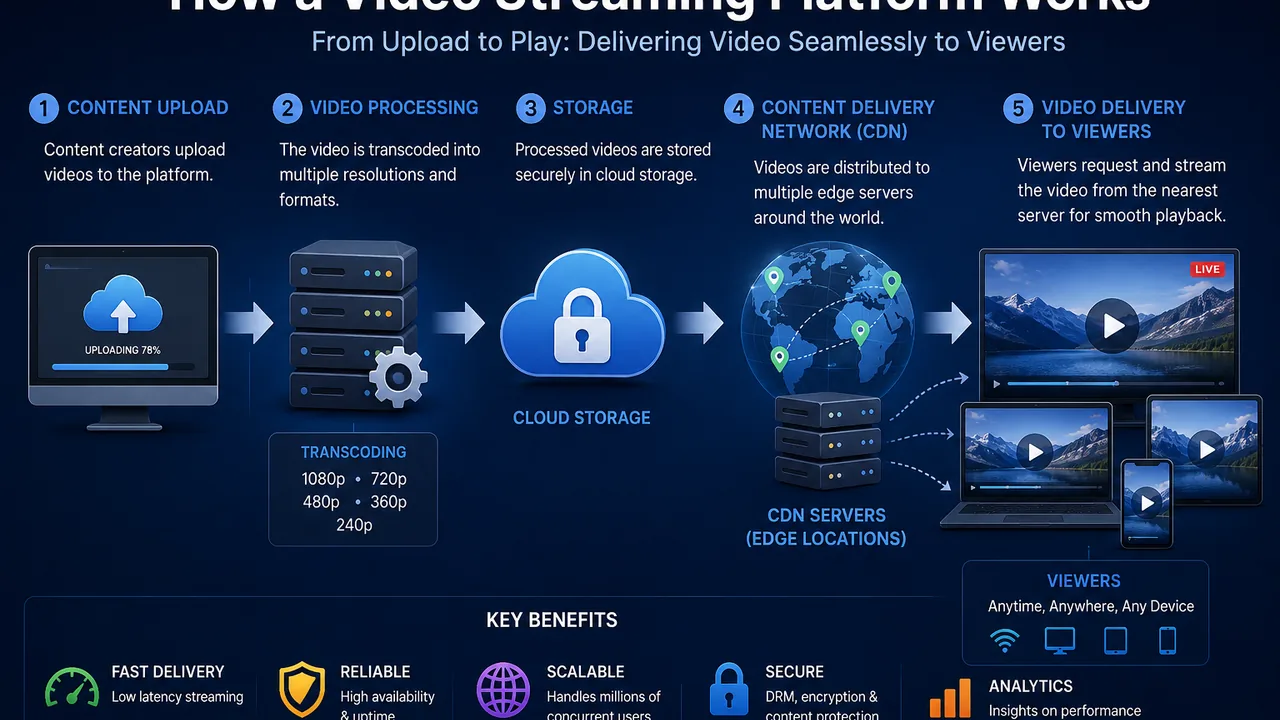
How Does a Video Streaming Platform Work? Complete Guide for 2026
Watching an online video feels simple. You press play, the video starts, and the player continues delivering content as you watch.
Behind that simple experience, however, several systems may be working together.
The original video has to be uploaded and stored. It may need to be processed into streaming-ready formats. The platform needs to deliver the content efficiently to different devices and network conditions, while the video player has to turn that delivery into a smooth viewing experience.
A video streaming platform brings these components together.
Understanding how this infrastructure works is useful whether you're building a video website, launching an online course, managing premium content, or simply trying to provide a better playback experience to your audience.
This guide explains the technology behind modern video streaming, what happens after a viewer presses play, and which features matter when choosing a streaming platform in 2026.
What Is a Video Streaming Platform?
A video streaming platform is infrastructure designed to prepare, manage, and deliver video content over the internet for online playback.
Rather than requiring viewers to manually download an entire video file before watching it, streaming technology allows playback to begin while content continues to be delivered.
A modern platform may handle several parts of this process, including:
- Video uploads
- Storage
- Processing
- Transcoding
- Streaming preparation
- Video delivery
- Embedded playback
- Access controls
- File management
For publishers, the result is a relatively straightforward workflow: upload a video, prepare it for streaming, embed the player, and allow viewers to watch it through a browser or compatible device.
FileMoon provides a dedicated video streaming platform for publishers who need online video delivery integrated with their websites and applications.
What Happens When You Upload a Video?
Everything starts with the source file.
A publisher might upload an MP4 or another supported video format. That original file may be perfectly playable on one device, but it isn't necessarily optimized for every viewer or network condition.
This is where processing becomes important.
Depending on the platform and source media, the uploaded video may be analyzed and prepared for online playback.
Instead of treating the uploaded source as the final viewing format, a streaming workflow can create streaming-ready media that is easier to deliver through web players.
The exact process varies between platforms, but the objective is generally the same: turn an uploaded video into content that can be reliably delivered online.
What Is Video Transcoding?
Transcoding is the process of converting video from one format, bitrate, resolution, or encoding configuration into another.
Imagine uploading a high-quality source video.
That exact version might work well for a viewer with a fast connection and modern device, but it may be unnecessarily demanding for someone watching on mobile data or a slower network.
A streaming workflow can prepare different versions of the source content.
For example, a platform may create lower and higher quality representations of a video where supported by its processing configuration.
This gives the delivery system more flexibility than simply serving one large original file to every viewer.
Transcoding is therefore one of the important components behind scalable online video delivery.
What Is HLS Video Streaming?
HLS stands for HTTP Live Streaming.
It is a widely used streaming approach in which video content can be delivered as a sequence of smaller media segments rather than as one monolithic file.
A playlist tells the player which segments are available and how they should be requested.
From the viewer's perspective, none of this needs to be visible.
They press play and watch the video.
Behind the scenes, the player continues requesting the media required for upcoming playback.
This segmented approach makes HLS useful for modern web-based video delivery.
Why Is HLS Useful?
Consider a traditional downloadable video file.
If the viewer wants to watch a portion of that content, the browser still has to interact with a comparatively large file.
With segmented streaming, the content can be divided into smaller pieces that are delivered as playback progresses.
This architecture provides several practical benefits.
It can make video delivery more adaptable, work well with web infrastructure, and support streaming workflows designed around multiple quality representations.
HLS isn't the only streaming technology available, but it has become an important part of online video infrastructure.
What Is Adaptive Bitrate Streaming?
Internet connections aren't constant.
A viewer might start a video on fast Wi-Fi and then experience congestion. Another viewer may be watching through mobile data. Someone else may have a much faster connection.
Sending exactly the same video representation to every viewer isn't always ideal.
Adaptive bitrate streaming addresses this by allowing a compatible streaming system to work with multiple representations of the same content.
When available, the player can select a representation appropriate for current playback conditions and potentially adjust as those conditions change.
The objective is to balance two things:
video quality and playback continuity.
If bandwidth becomes constrained, a lower-bitrate representation can be preferable to repeatedly interrupting playback while waiting for more data.
When conditions improve, higher-quality delivery may become possible.
What Happens When a Viewer Presses Play?
This is where all the earlier processing becomes useful.
In simplified terms, the playback process can look like this:
- A viewer opens a webpage containing the video player.
- The player loads the information needed to access the stream.
- The player requests the appropriate media.
- Initial video data is buffered.
- Playback begins.
- Additional media is requested as the viewer continues watching.
- The player maintains enough buffered content to support continuous playback.
The actual implementation can be more complex, particularly when authentication, multiple quality levels, advertising, analytics, or other services are involved.
But the fundamental objective remains straightforward:
deliver enough video data at the right time to keep playback running smoothly.
Why Does Video Buffer?
Buffering occurs when the player doesn't have enough media data available to continue playback. If playback performance is a major concern, read our practical guide on how to reduce video buffering for a deeper look at bitrate, HLS delivery, encoding, and infrastructure.
There isn't one universal cause.
Possible factors include:
- Slow viewer internet connection
- Network congestion
- High video bitrate
- Delivery infrastructure
- Device limitations
- Browser behavior
- Insufficient buffered media
- Problems with the source or processed video
- Temporary connectivity interruptions
This is why promising "zero buffering" would be unrealistic.
Even an excellent streaming infrastructure can't control a viewer's local internet connection.
A well-designed system instead attempts to reduce avoidable interruptions and adapt delivery where possible.
Video Hosting vs Video Streaming
These terms are often used interchangeably, but there is a useful distinction.
Video hosting is primarily concerned with storing and managing video content.
Video streaming is concerned with delivering that content to viewers during playback.
In practice, modern platforms often combine both.
You upload a file to the hosting layer, the platform processes it, and the streaming infrastructure delivers the resulting content to the viewer.
This is why publishers looking for complete infrastructure should consider both their video hosting platform and streaming requirements rather than treating them as completely separate decisions.
Why Not Stream Directly From Your Website Server?
A standard web server can technically serve video files.
The question is whether that's the best architecture for your project.
Video files can be much larger than typical website resources. As concurrent viewing increases, video delivery can consume substantial bandwidth and server resources.
The same server may also be responsible for:
- Processing PHP requests
- Running your application
- Handling database connections
- Serving webpages
- Processing user actions
- Handling uploads
Adding significant video-delivery traffic to the same environment can increase the workload.
Separating the application layer from the video-delivery layer can therefore make infrastructure easier to manage as usage grows.
The Video Player Is a Critical Part of Streaming
Streaming infrastructure can be technically sophisticated, but the viewer interacts with the player.
That's why player quality matters.
A useful web player should make common actions intuitive, including:
- Starting and pausing playback
- Seeking through the video
- Adjusting volume
- Entering fullscreen
- Watching on mobile
- Selecting available playback options
Loading behavior is particularly important.
A viewer expects the page itself to remain responsive even while video resources are being prepared.
Publishers should therefore test the complete playback experience rather than evaluating a streaming provider solely from its backend specifications.
Why Seeking Matters
Seeking occurs when a viewer moves to a different point in the video.
For example, someone watching a 40-minute tutorial might jump directly to minute 25.
The streaming system then needs to provide the media required for playback around the requested position.
Fast, predictable seeking can make a major difference for long-form videos, tutorials, courses, and other content where viewers frequently move through the timeline.
When evaluating a platform, don't only press play from the beginning.
Test how playback behaves when you move forward and backward through the video.
Video Streaming on Mobile Devices
A significant portion of online video consumption occurs on phones and tablets.
That creates additional considerations.
Mobile connections can vary considerably in speed and stability. Screen sizes are different, browser behavior can differ, and users may switch between Wi-Fi and cellular networks.
A streaming platform should therefore be evaluated on actual mobile devices rather than only on a desktop computer connected to fast broadband.
Test:
- Player responsiveness
- Portrait and landscape behavior
- Fullscreen playback
- Seeking
- Initial playback
- Quality changes where supported
- Performance on slower connections
A streaming experience that works beautifully on a developer's desktop isn't automatically a good mobile experience.
Security Is Also Part of Video Streaming
Delivery performance isn't the only concern.
Some publishers need greater control over who can view content and where it can appear.
For example:
An online course may contain lessons intended only for students.
A company may have private training videos.
A membership website may provide premium video content.
A publisher may want to prevent its player from being embedded freely across unrelated websites.
These use cases require streaming to work alongside appropriate access controls.
Publishers handling private content should therefore evaluate the provider's secure video hosting capabilities in addition to playback performance.
Embedded Video Streaming
One major advantage of dedicated streaming infrastructure is the ability to keep viewers on your own website.
Instead of redirecting users to an external video page, publishers can place the player directly inside their content.
This is useful for:
- Online courses
- Blogs
- Membership websites
- SaaS applications
- Media websites
- Documentation
- Customer portals
- Product demonstrations
Embedding gives the publisher greater control over the surrounding experience.
The video becomes part of the website rather than the website simply acting as a link to another platform.
Video Streaming for Online Courses
Educational video has particular requirements.
Students may watch long lessons, pause frequently, move backward to repeat explanations, and jump between different sections.
Course owners may also need the videos to remain inside authenticated lesson pages.
When evaluating streaming for an educational platform, focus on:
- Playback reliability
- Seeking
- Mobile compatibility
- Embedded playback
- Access controls
- Long-form video performance
- Video organization
The needs of an online course can therefore be very different from those of a short-form public video network.
Video Streaming for Membership Websites
For membership websites, the video itself may be part of the product customers are paying to access.
That makes both delivery and control important.
The player needs to work reliably, but publishers may also want to limit how premium content is accessed or embedded.
This is where streaming, hosting, application authentication, and content-access policies need to work together.
The hosting provider handles video infrastructure, while the membership application can manage the user relationship and entitlement logic.
Video Streaming for Media Websites
Media websites can have very different traffic patterns from small business sites.
One video may receive relatively little traffic while another suddenly attracts a large audience.
A growing media library also creates storage, organization, processing, and delivery requirements.
For this reason, media publishers should think about streaming as infrastructure rather than simply another website feature.
The system should be selected with future growth in mind.
Video Streaming for Businesses
Businesses use streaming for much more than entertainment.
Common applications include:
- Product demonstrations
- Employee training
- Customer onboarding
- Internal presentations
- Tutorials
- Support content
- Marketing videos
Not every business video needs to be public.
A company may want certain content embedded only in its own application or accessible to a limited audience.
This means business streaming decisions should consider both viewing quality and content control.
Live Streaming vs On-Demand Streaming
These are two different workloads.
On-demand video has already been recorded and uploaded. The viewer decides when to start watching it.
Live streaming delivers content while an event is happening.
Live video introduces additional infrastructure requirements because content must be captured, processed, and distributed with minimal delay while the event is taking place.
A platform that's excellent for on-demand video isn't automatically a complete live-streaming solution.
Before selecting a provider, make sure its capabilities match the type of streaming you actually need.
How Much Bandwidth Does Video Streaming Use?
There is no single answer because usage depends on several variables.
Important factors include:
- Video bitrate
- Playback duration
- Number of viewers
- Amount of each video watched
- Quality level delivered
- Repeat views
A simple way to understand the relationship is:
higher bitrate × longer viewing time × more viewers = more data transferred.
This is why streaming-heavy websites should evaluate delivery usage rather than focusing only on how many gigabytes of video are stored.
A relatively small library can still generate substantial transfer if its videos receive large amounts of traffic.
How to Choose a Video Streaming Platform
Start with your actual use case rather than a list of marketing claims.
Ask:
What type of videos will I stream?
How large is my audience?
Will videos be embedded on my website?
Do I need private content controls?
How important is mobile playback?
Do viewers frequently seek through long videos?
How much content will I upload?
Will developers need integration capabilities?
Then evaluate providers based on those answers.
Key areas worth examining include:
- Upload workflow
- Video processing
- Streaming technology
- Player experience
- Mobile playback
- Seeking
- Embedding
- Security options
- File management
- Scalability
- API capabilities
- Storage model
- Delivery usage and pricing
A platform should fit your complete workflow, not simply perform well in one category.
Common Video Streaming Mistakes
One mistake is assuming that uploading an MP4 file automatically creates an optimized streaming architecture.
Another is choosing a provider solely because it offers a large amount of storage.
Storage matters, but viewers experience delivery—not your storage dashboard.
Publishers also sometimes test only a short video on a fast office connection.
That doesn't reveal how the system behaves with long videos, mobile devices, seeking, slower networks, or increased traffic.
Finally, don't ignore security until after the platform is integrated.
If private content is central to your business model, access requirements should be considered from the beginning.
Is a Dedicated Video Streaming Platform Worth It?
For a website with one or two small videos and very little traffic, specialized streaming infrastructure may not be essential.
The calculation changes as video becomes more important.
If your website depends on video for its product, audience, subscriptions, education, or publishing operation, dedicated infrastructure can separate demanding media workloads from the main application.
It can also provide a more structured workflow for processing, embedding, managing, and delivering video.
The decision should ultimately be based on the value and scale of video within your project.
Final Thoughts
A video streaming platform sits behind what appears to the viewer to be a simple Play button.
The platform may need to accept an uploaded source, process it, prepare streaming media, deliver video segments, support the player, handle seeking, work across devices, and maintain playback as network conditions change.
That's why selecting video infrastructure should involve much more than comparing storage limits.
Consider the complete path from upload to playback.
For publishers who need dedicated online video delivery, you can explore FileMoon's video streaming platform.
If your requirements extend to broader video management and hosting, see the video hosting platform. For projects where access and content protection are particularly important, explore secure video hosting.



Comments (0)
No comments found